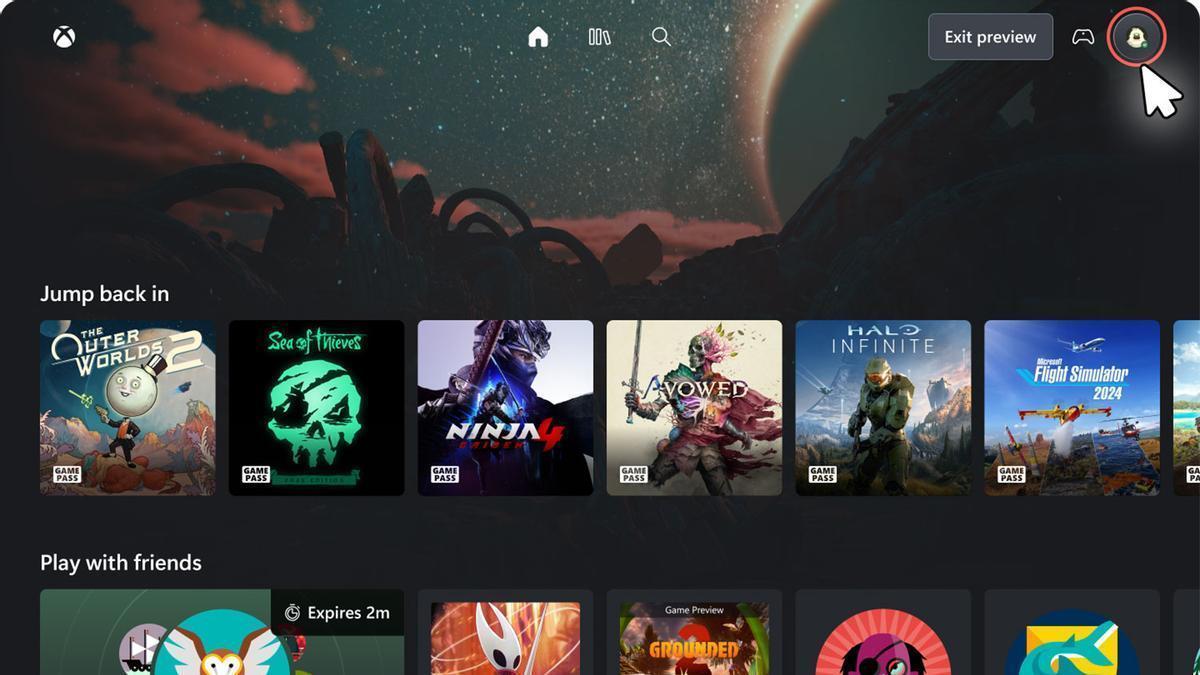


Microsoft Unveils a New Look for Xbox Cloud Gaming Interface
Microsoft is preparing a new look for the interface of Xbox Cloud Gaming, which is available in public preview for Xbox Insider program users who want to try it out. The design has been almost completely renewed and new animations have also been implemented. This move is part of the company’s efforts to create a more seamless and engaging gaming experience for its users.
According to Microsoft’s official blog, “We are testing a redesigned web experience for Cloud Gaming that creates the foundation to accelerate our ability to create new experiences for players.” This statement suggests that the changes to the Xbox Cloud Gaming interface are just the beginning, and we can expect to see similar updates to other Xbox interfaces in the future, including the console itself.
The New Xbox Cloud Gaming Experience
The new interface brings the Xbox Cloud Gaming browser experience closer to that of the console, while introducing some changes to the design and animations. “This preview is a first look at our new web interface in your browser, something that will allow you to test the design and updated product journey before wider distribution.” This means that users can expect a more console-like experience when playing games on their browsers.
The mention of creating a “foundation for new experiences” can be interpreted as an indication that these new features will be reflected in other Xbox apps in the future. This could include not only the consoles but also the PC application. However, as this is a preview, some parts may change or behave differently during the test.
Xbox Gaming. / ASSIGNED
How to Try the New Xbox Cloud Gaming Interface
Discovering the new visual features of Xbox Cloud Gaming is very simple. First, visit xbox and sign in with your account, as you always do to play in the Microsoft cloud. Next, you need to go into settings and ensure that the preview features option is enabled, marked “Preview Features.”
The next step is to wait for the message for the Cloud Gaming “new experience” to appear. Microsoft indicates that it may take up to 10 minutes to appear after activating the option. Then, simply follow the on-screen instructions and try out the new interface. If it does not convince you, at least until it is relieved, you will have the possibility of returning to the previous interface.
For more information on the new Xbox Cloud Gaming interface and how to try it out, you can visit the official Microsoft blog or check out the source link Here
Images Credit: www.diariodemallorca.es